Guided setup
NewA three-minute walkthrough builds your first budget with your own money: add an account, pick envelopes, and give every dollar a job.
Plan every dollar, keep transactions accurate, understand your progress, and share the work without paying for a maze of feature tiers.
Here's everything in the envelope budgeting app, from envelopes and goals to the Debt Center.
Plan income, inspect an envelope, find the exact transaction you need, and turn the results into useful reports. These are real EnvelopeBudget screens.
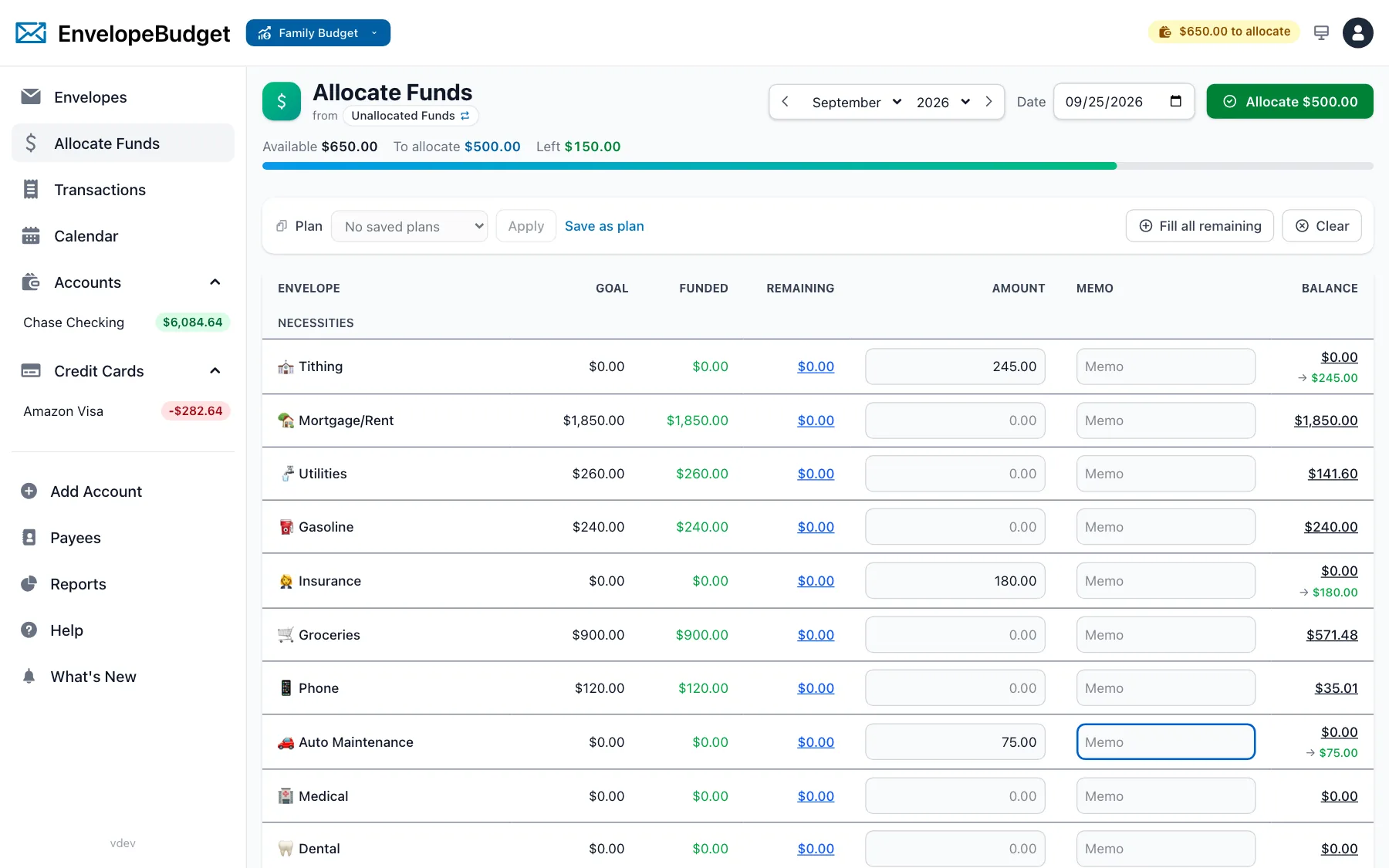
Allocate new income across envelopes, reuse saved plans, and see funded, remaining, and available amounts before committing a cent.
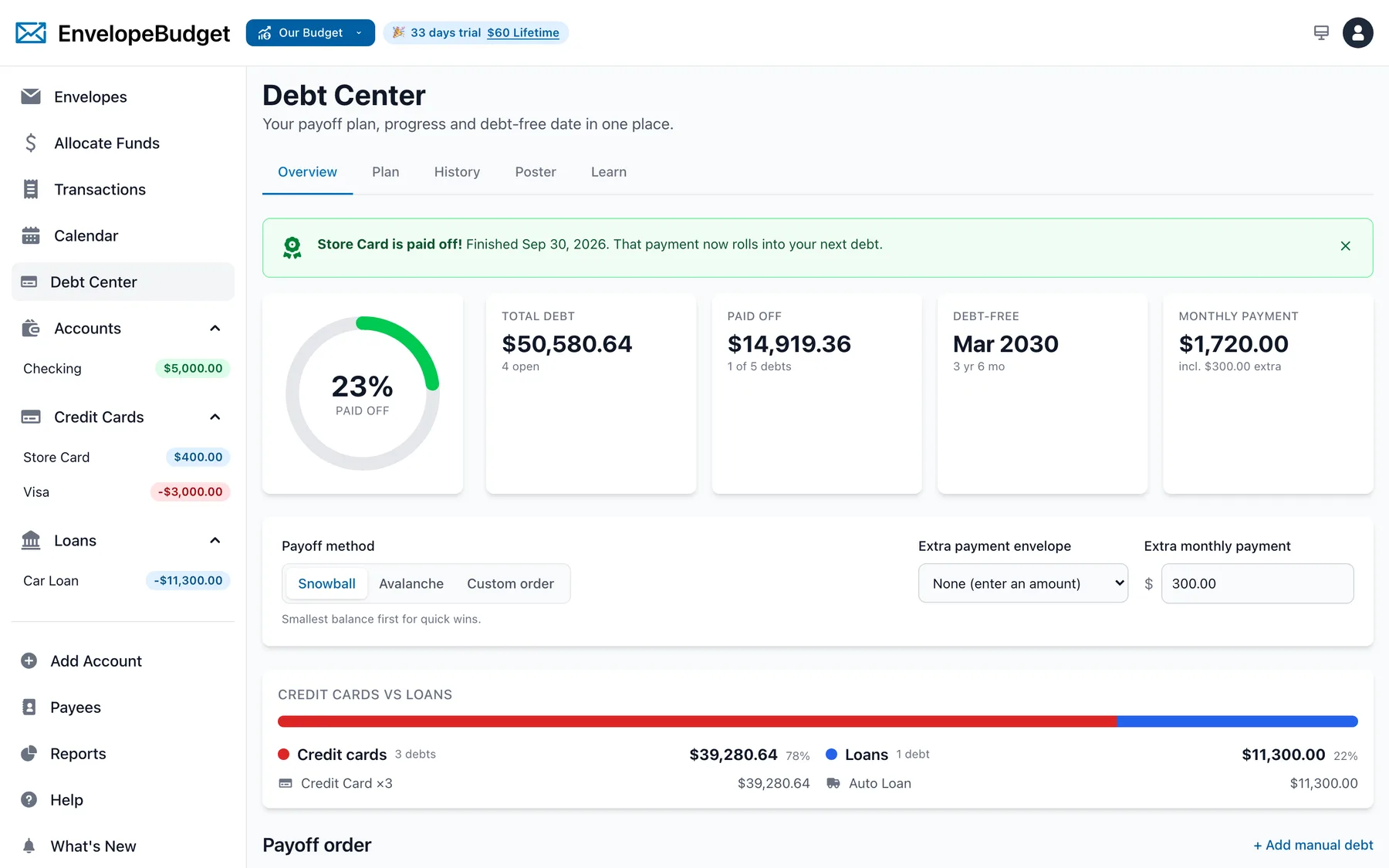
The Debt Center turns your credit card and loan accounts into a snowball or avalanche plan: debt-free date, payoff order, progress, and a credit cards vs loans breakdown, all from the transactions you already track.
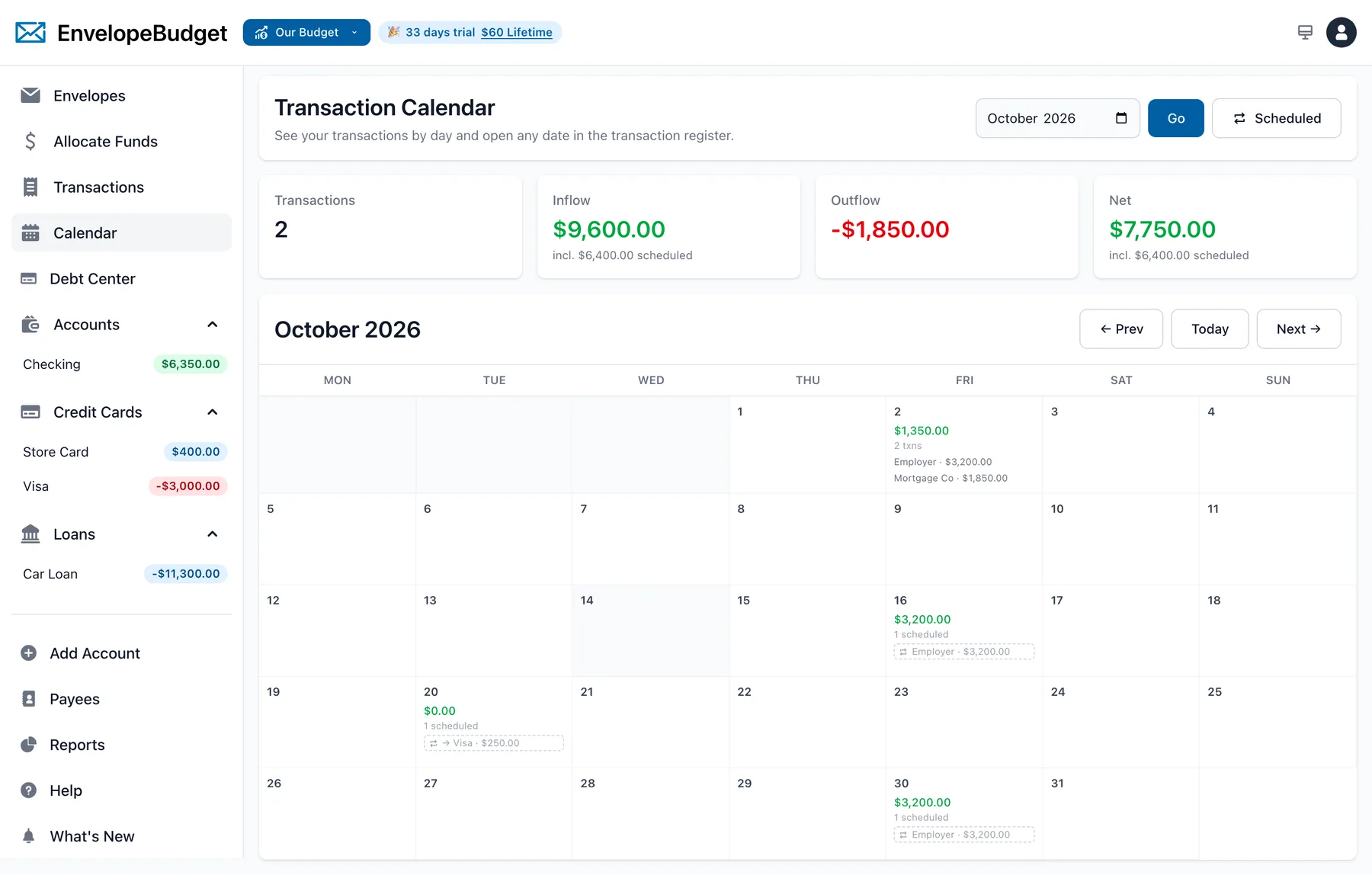
Repeating transactions show on the calendar ahead of time, enter the register as pending a few days before they are due, and clear themselves when the bank import arrives.
Family & Team gives everyone their own login. Choose No access, Viewer, or Editor for each person on each budget. The family owner can see every family budget; other members see only the ones you share.
Walk through family and team sharing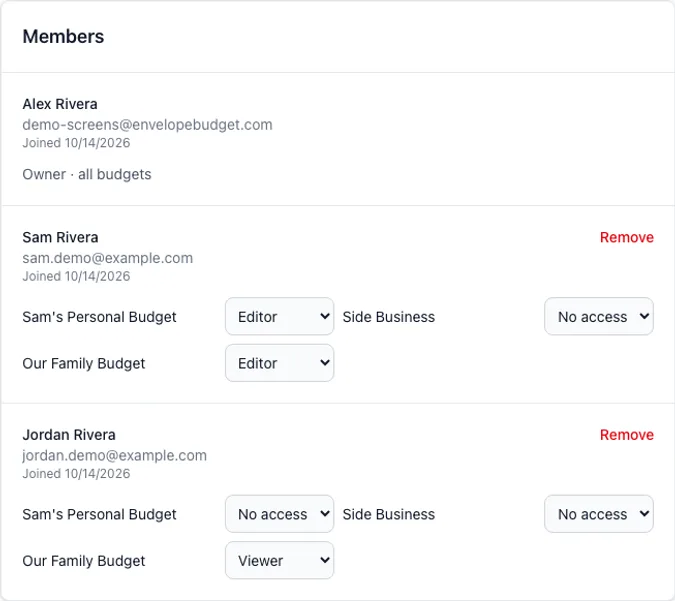
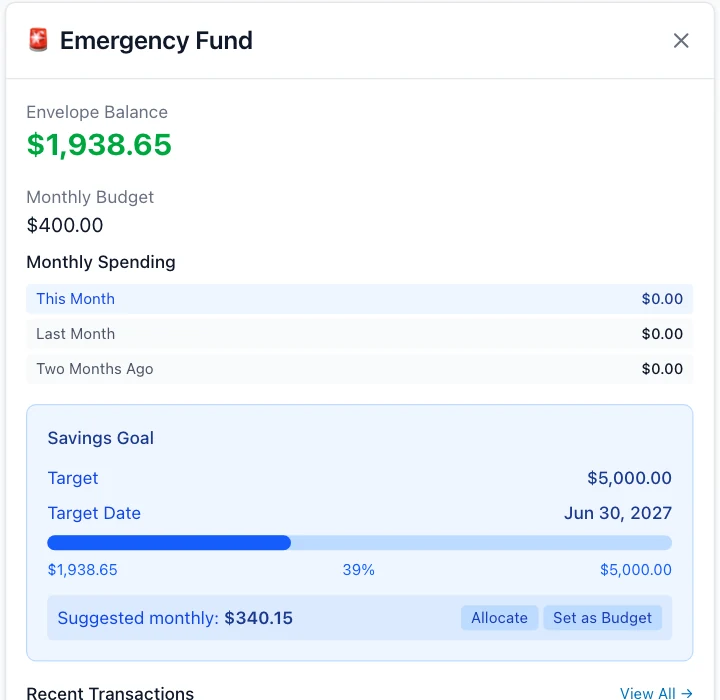
Open an envelope to see its balance, recent activity, monthly spending, and savings-goal progress together.
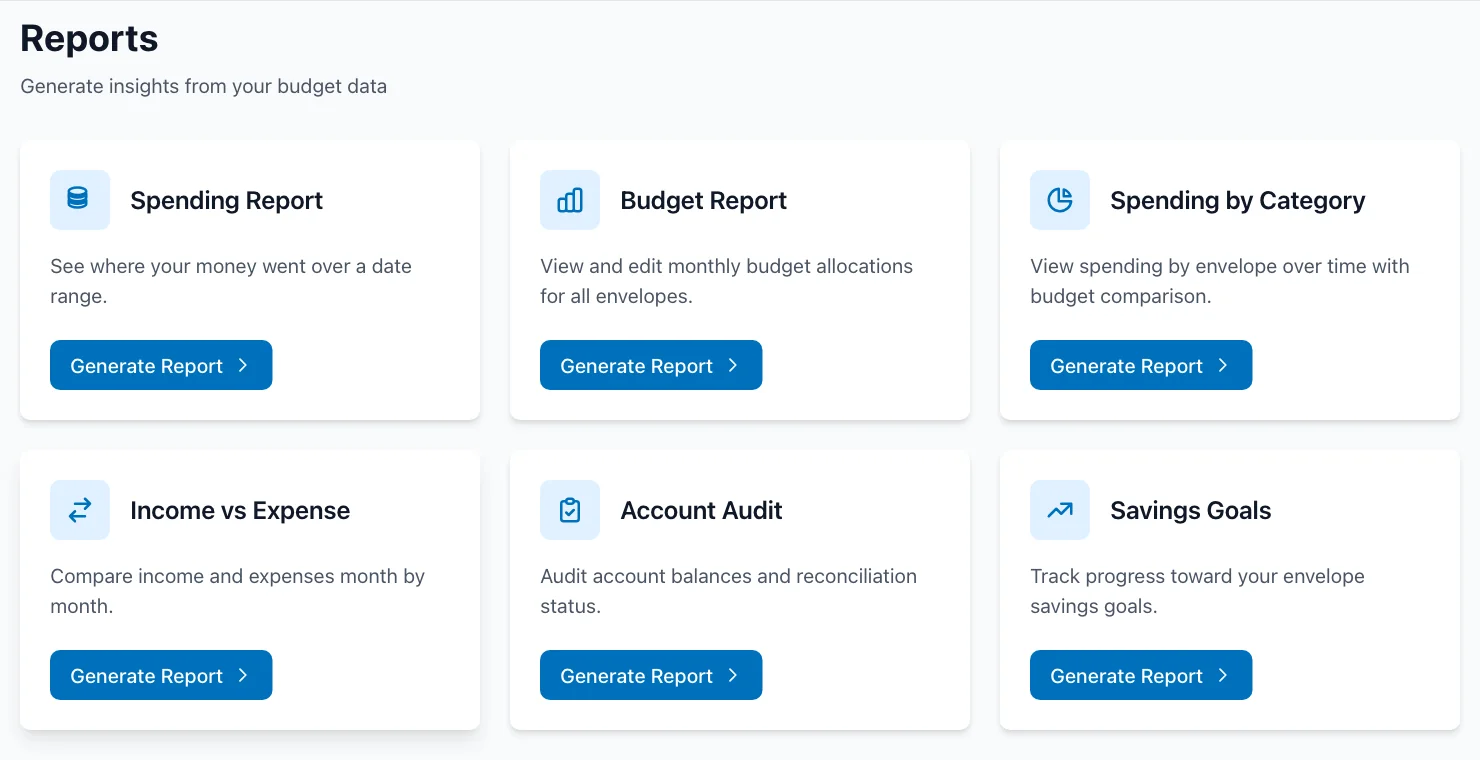
Review spending, budgets, categories, account accuracy, cash flow, and savings goals from one place.
Combine plain terms with filters for status, account, envelope, payee, date, amount, transfers, splits, and more.
Open full size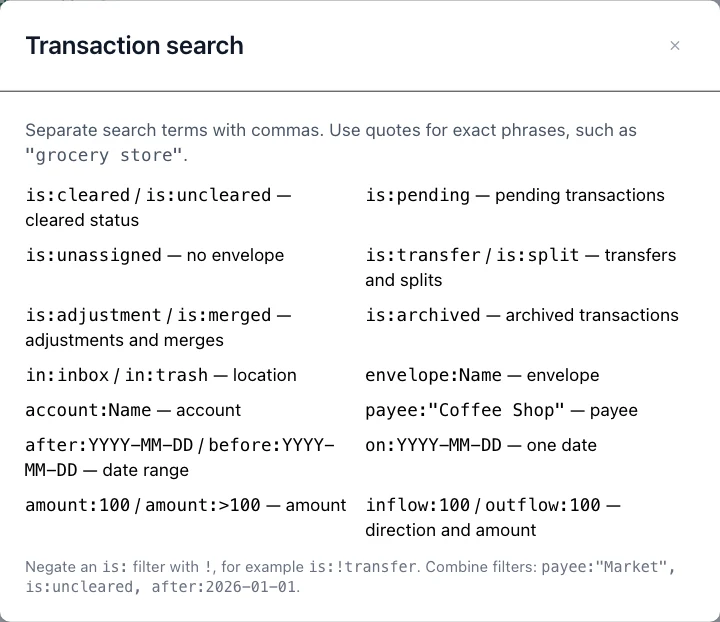
Plan every dollar with flexible digital envelopes.
A three-minute walkthrough builds your first budget with your own money: add an account, pick envelopes, and give every dollar a job.
Tracks your first steps automatically from your real budget, highlights what's next, and disappears when you're done.
Create as many spending, saving, and debt envelopes as your plan needs.
Group related envelopes and reorganize them as your budget changes.
Set a planned amount for each envelope and compare the plan with actual spending.
Assign available income across envelopes from one focused allocation screen.
Save paycheck or income templates and fund many envelopes in one pass.
Transfer available funds without creating fake income or expenses.
Set target amounts and dates, then track progress toward each goal.
Plan debt payments while keeping balances and spending visible.
Keep reminders and context with the envelope they belong to.
Create separate budgets for households, projects, or different financial plans.
Keep daily money movement accurate without turning it into a second job.
Set up bills, paychecks, and transfers that repeat weekly, every N weeks, monthly, twice a month, or yearly, with an end date or count.
How it worksEach occurrence appears as a pending transaction a few days early, turns uncleared on the due date, and is taken over by the matching bank import.
Future occurrences show on the transaction calendar before they happen, with skip, enter now, and edit from any day.
Open a transaction and choose Make repeating to use it as the template for a series.
Track checking, savings, cash, credit cards, loans, investments, and other accounts.
Add income and expenses quickly from web, iPhone, or Android.
See what has posted at the bank and what is still pending.
Divide one purchase among multiple envelopes, with optional notes for each split.
Move money between accounts while keeping both sides connected.
Link imported transfer counterparts when account, date, and amount agree.
Enter your statement balance and see a live preview of your cleared balance and any difference before anything changes.
Filter transactions by date, account, envelope, status, amount, and search terms.
Keep imported activity waiting for review before it changes the budget.
Avoid importing the same bank transaction more than once.
Clean up merchant names and remember how future imports should appear.
Show, hide, and reorder transaction columns; preferences follow your account.
Move through transactions and review, edit, clear, archive, or take other common actions from the keyboard like a Gmail inbox.
Reverse recent transaction, envelope, allocation, split, transfer, archive, and merge actions.
Add context and make accounts easier to recognize throughout the register.
Bring in the data you want and keep a human review step where it matters.
Securely import activity from thousands of financial institutions.
Start a new connection without pulling in years of unwanted history.
See which connected accounts updated and where an import needs attention.
Every pull accounts for pending and uncleared transactions, shows a receipt-style breakdown, and points to the transaction that explains any gap.
Upload transaction files from institutions that do not support automatic sync.
Import exported YNAB budget data and preserve accounts, envelopes, transactions, and balances.
Move or back up account, envelope, allocation, goal, transfer, and badge data.
Get category suggestions without letting automation silently change your envelopes.
Click Sync Amazon in your inbox: EnvelopeBudget Helper for Chrome matches each Amazon payment to its transaction and adds the item names, with one-click undo.
Install from the Chrome Web StoreMark credits that should reach an envelope without inflating income reports.
Understand where the money went and adjust the plan with evidence.
Review income, spending, and transactions for any date range.
Compare category and envelope spending across months, including budget variance.
Review and bulk-edit monthly envelope targets from one report.
See monthly totals, net change, and the transactions behind each number.
Check stored and calculated balances and diagnose reconciliation differences.
See target amounts, dates, current balances, and remaining progress together.
View income, expenses, net change, top categories, and date-range summaries on mobile.
Explore mobile trend charts, period comparisons, assets, liabilities, and net worth.
Download supported reports as CSV, Excel, or Markdown.
Turn the debts already in your budget into a living snowball or avalanche plan.
Credit card, loan, and line-of-credit accounts enroll automatically with balances from your ledger; add manual debts for anything else.
See how it worksPick a method, drag debts into your own order, and see which debt to attack now and what comes next.
Debt-free date, total interest, and a balance chart that responds as you try extra monthly or one-time payments.
Snowball, avalanche, and minimums-only side by side, with the interest each approach saves.
Point the plan at a Debt Snowball envelope so the extra payment follows what you actually fund each month.
Each card shows the most recent payment, percent paid against the starting balance, and APR and payment details.
See how much of your debt is revolving versus installment, with per-type totals.
Month-by-month balances, payments, and interest charges derived from your transactions.
A one-page thermometer, debt checklist, and milestone tracker for the fridge.
Read-only MCP tools expose the plan and payoff projection to a connected assistant.
Build integrations and give trusted AI agents structured access to your budget.
Work with budgets, accounts, envelopes, transactions, reports, imports, and other core EnvelopeBudget data from software or AI agents.
Explore the APIOAuth 2.1 and dynamic client registration let compatible clients connect through your browser. Select budgets, explicitly approve optional categorization permissions, and revoke connections anytime.
See browser sign-inCreate revocable, expiring keys for integrations. MCP keys are read-only by default, with separate opt-in categorization permissions.
Explore available endpoints, schemas, and request formats from live API documentation.
View interactive docsConnect compatible AI assistants for budget reviews, spending and cashflow analysis, provider suggestions, and agent-native inbox categorization. OAuth browser sign-in and existing API keys are supported; access is read-only by default.
Explore MCPUse the same budget on the device you have, without surrendering control of your data.
Use the complete web experience from a modern desktop or mobile browser.
Download EnvelopeBudget from the App Store.
Download EnvelopeBudget from Google Play.
View cached envelopes, accounts, and recent transactions without a connection.
Create transactions offline and sync them automatically when connectivity returns.
Choose a theme or follow the device setting on web and mobile.
Choose your country's currency from a drop-down, then fine-tune the symbol, decimals, separators, and date format per budget.
Delete your account and personal data from web or mobile with clear confirmation.
EnvelopeBudget does not fund itself by selling personal financial data.
Monthly, annual, and lifetime members use the same product without feature gates.
Every paid plan includes the complete feature set. Bank sync is optional: the Plaid add-on ($3/month or $30/year), or SimpleFIN paid directly to SimpleFIN ($1.50/month or $15/year).
Comparing apps? Read our guide to the best envelope budgeting app or see EnvelopeBudget vs other apps.