Your Budget Shouldn't Start Over Every Month: Why EnvelopeBudget Uses Rolling Envelopes
With cash envelopes you never made new envelopes on the 1st. You kept the same ones and refilled them on payday. EnvelopeBudget works the same way, and it quietly fixes a lot of the things people complain about in month-based budgets.

With real cash envelopes, nobody makes new envelopes on the first of the month.
You have one envelope for groceries, one for gas, one for the car, one for Christmas. On payday you put cash in them. When you buy groceries, the cash comes out of the grocery envelope. Whatever is left stays there. Nobody closes the grocery envelope at midnight on the 31st and hands you a fresh one.
That is how EnvelopeBudget works, and it is one of the biggest differences between it and most other envelope-style apps. Each envelope has one running balance. The budget doesn't restart every month. You refill envelopes when money comes in, you spend from them when money goes out, and the balance is simply what's in the envelope right now.
If you've only used month-based budgeting apps, that may sound like a small detail. In practice it removes a whole category of problems.
How month-based budgets work
YNAB, Actual Budget, and many apps modeled on them organize your budget as a grid of months. Every month gets its own column: what you assigned that month, what you spent that month, and what's available at the end of it. That available amount rolls into the next month's column.
To be fair, positive balances do carry forward in those apps. Your grocery money doesn't vanish on the 1st. But the budget is still built month by month, and the month boundary has rules of its own:
- Each month is its own budget. You assign money "to November," and next month you assign again to December.
- Overspending is settled at the month boundary. In Actual, for example, if a category ends the month overspent (and you haven't turned on rollover overspending), the overspent amount comes out of next month's To Budget and the category starts the new month at zero.
- Past months stay open. A transaction dated in a past month changes that month's numbers, and the change flows forward into every month after it.
None of that is wrong. It's a coherent design. But it means you're managing two things: your envelopes, and a calendar of budgets that sits on top of them.
The problems that come from the month boundary
If you've spent time in budgeting forums, these will sound familiar.
Transactions that sync late change last month
You buy groceries on the 30th. The charge posts on the 2nd, and your bank sync picks it up on the 3rd. In a month-based budget, that transaction is dated in last month, so it lands in last month's column. Last month's grocery category, which you thought was finished, now shows less (or is overspent), and the effect rolls forward into this month. You go looking for why this month's numbers moved and find the cause in a month you'd already closed.
Credit card transactions, checks that clear a week later, and pending charges that settle after the 1st all do the same thing.
Overspending gets handled for you, sometimes in a surprising way
When a category is overspent at the end of a month, a month-based app has to decide what to do with that negative number before the new month starts. Depending on the app and its settings, it may come out of next month's money to assign or carry forward as a negative balance. Each rule makes sense on its own, but it happens at the month boundary, and people regularly end up asking "where did this money go?"
Paychecks don't line up with months
Most people aren't paid on the 1st. If you're paid every other Friday, some paychecks arrive near the end of a month to pay bills due early in the next one. You end up either assigning money "to next month" before next month exists, or budgeting this month with money that's really meant for next month's rent. If you're paid weekly, or your income is irregular, the mismatch is even bigger.
The 1st becomes a chore
A new month means a new column to fill. Many people describe a monthly ritual of re-budgeting, sweeping leftovers, and fixing last month before they can start on this one.
How a rolling envelope budget handles the same situations
In EnvelopeBudget there's no month column. There's the envelope, and there's its balance.
Late transactions just come out of the envelope
The grocery charge from the 30th syncs on the 3rd. It's still dated the 30th, so your reports put it in the right month. But in the budget, it simply comes out of the Groceries envelope, and the Groceries balance goes down by that amount. There's no closed month to reopen and no change cascading forward. It's exactly what would happen with a cash envelope if you found a receipt you forgot to account for: the money was spent, so it's no longer in the envelope.
Overspending is visible, and you decide what to do
If an envelope goes negative, it shows red and stays red until you deal with it. You can move money in from another envelope or from Unallocated Funds, or leave it negative and refill it on your next payday. Nothing moves on its own when the calendar flips. A negative envelope is just an envelope with a negative balance.
You budget money when it arrives
Each paycheck goes into Unallocated Funds (you assign it there, or its payee does it automatically), and you move it into envelopes whenever it shows up, whether that's the 1st, the 15th, or a random Tuesday. If you split every paycheck the same way, save that split as a paycheck plan and apply it in one click. It fills in the amounts for you to review; nothing moves until you confirm. If your income varies, the plan can use percentages instead of fixed amounts.
This is why EnvelopeBudget works with any pay schedule without special settings:
- Biweekly: fund each bill envelope with its share from every paycheck. The third paycheck in a long month is just another deposit. See how to budget monthly bills when you get paid biweekly.
- Weekly: refill a little at a time. See how to budget weekly paychecks.
- Irregular or freelance income: allocate what came in, when it came in. See envelope budgeting with irregular income.
- Twice a month, monthly, or a mix of incomes: the same idea. Money arrives, money goes into envelopes.
Rent is due on the 1st? The rent envelope simply needs to have enough in it by the 1st. Whether that money came from one paycheck or three doesn't matter.
No monthly reset
On the 1st you don't have to do anything. Your envelopes still hold what they held on the 31st. Sinking funds keep growing, a half-used grocery envelope keeps its leftovers, and an envelope you've been saving in for a year shows one number: how much you have. If you'd like a regular check-in, a weekly money routine works well, but it's for you, not because the app needs a new month set up.
Months still exist (where they're useful)
A rolling budget doesn't mean EnvelopeBudget ignores the calendar. Months are still useful for planning and looking back, so they show up where they help:
- Planned monthly amounts. Each envelope can have a monthly goal, like $900 for groceries or $140 for electric.
- What you funded this month. The Allocate Funds page shows each envelope's goal, how much you've funded it this month, how much is left to reach the goal, and its running balance. Switching the month at the top changes the plan you're looking at, not the envelope balances.
- Reports. The Spending report covers any date range you pick (a month, a pay period, a year), Spending by Category breaks spending down month by month against your monthly amounts, and Income vs Expense shows month-over-month trends. A late transaction still counts in the month it happened.
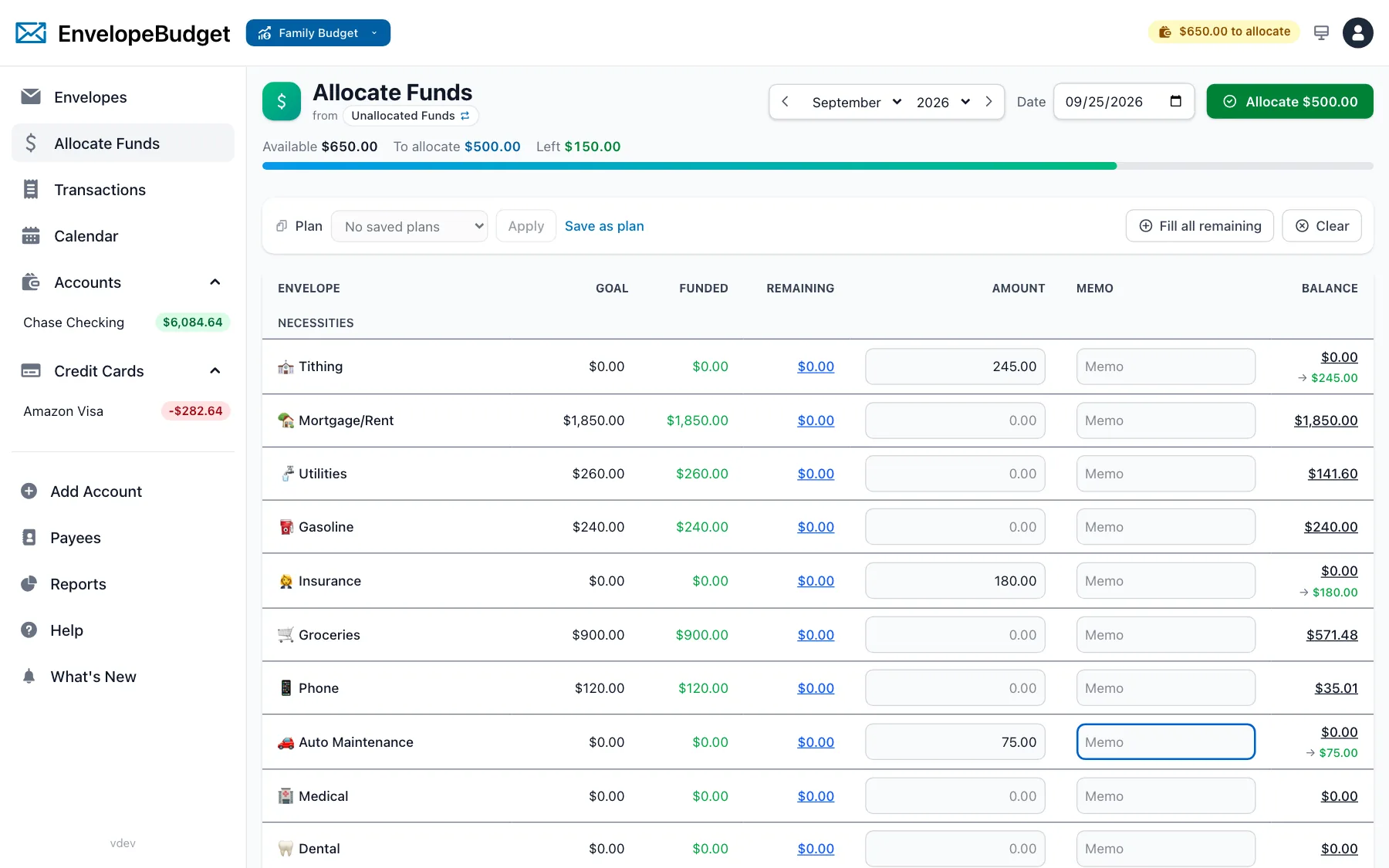
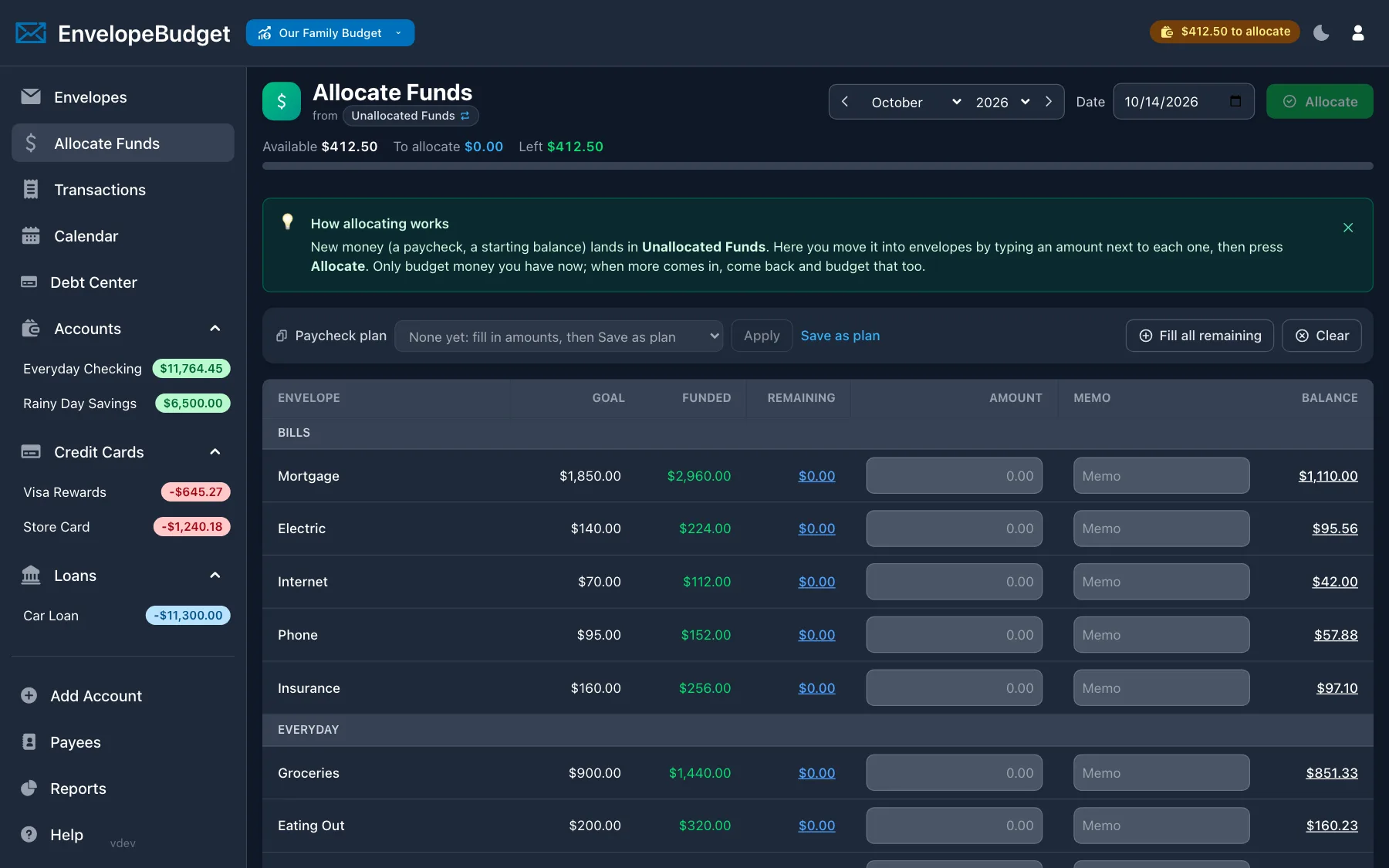
The difference is that months are a way to view your budget, not the structure your money lives in. The balance in an envelope is never split into "this month's money" and "last month's money." It's just money in an envelope.
Is a rolling budget right for you?
Month-based budgeting works for a lot of people, especially if you like closing out each month and starting the next one fresh. If that's you, a month-based app may suit you fine.
A rolling envelope budget tends to fit better if:
- You used cash envelopes and want a digital version that behaves the same way
- Your paychecks don't line up with calendar months
- Bank sync delays keep moving last month's numbers
- You'd rather fix overspending yourself than have the app roll it into next month
- The first of the month has become a chore
Switching from YNAB or Actual
You don't have to rebuild anything by hand. EnvelopeBudget imports your YNAB or Actual budget, including your transaction history, and turns the month-by-month budget into running envelope balances. The Actual importer replays your budget one month at a time, so each envelope lands on the balance Actual shows for the current month and To Budget becomes Unallocated Funds. From there, you just keep going. There is no "next month" to set up.
If you're coming from YNAB, the YNAB alternative guide covers the switch step by step, and the EnvelopeBudget vs YNAB comparison puts the two side by side. For Actual, see EnvelopeBudget vs Actual Budget.
New to envelopes altogether? Start with the envelope budgeting guide, then try EnvelopeBudget free for 34 days. Set up a few envelopes, put your next paycheck in them, and notice that when the month changes, nothing about your budget does.
Frequently asked questions
Does EnvelopeBudget have a monthly budget?
Not in the YNAB or Actual sense. Each envelope has one running balance that carries forward forever, like cash in a real envelope. You can still set a planned monthly amount per envelope, see what you funded this month, and run monthly reports, but there is no month-by-month budget grid to roll over or close out.
What happens when a transaction from last month syncs late?
It comes out of the envelope it belongs to, and that envelope's balance goes down by that amount. Its date stays correct for reports, but there is no past month whose numbers change and roll forward into this one.
Does EnvelopeBudget work with biweekly, weekly, or irregular pay?
Yes. You allocate money when it arrives, whatever the schedule. Each paycheck is assigned to Unallocated Funds and you move it into envelopes, by hand or with a saved paycheck plan. A third paycheck in a month is just another deposit, not a special case.
What happens to my envelope balances when I import from YNAB or Actual?
The importers bring in your transactions and budget history and turn them into running envelope balances. For Actual, each envelope ends up with the same balance Actual shows for the current month, and Unallocated Funds matches To Budget.